
This is another big one – I’m covering video generators. There are quite a few that people are talking about, and most of them aren’t as easily accessible as the LLMs and image generators. Some have free usage tiers, but the generation speed is slow (as in hours to days), while others will give you a small, one-off credit bundle to have a go. In all, if you want to create videos, you’ll need to pay.
There are going to be a lot of links, as I can’t embed videos in this particular blog but I’ve pulled them down into relevant areas,
Video Prompting
Text to Video
In a lot of ways it’s very similar to image prompting (subject, description, style), but this is a lot more than one image, and it helps if you have a bit of an idea about camera movements, angles, and shots. If you don’t, then using an LLM to help with the prompts can be useful, something like this could give you a starting point:
You are an experienced videographer and video director who is great at understanding and describing the technical aspects of camera shots and movement to get certain effects, moods, and visuals. I want to create a video of [insert subject, description, style]. What information do you need to be able to create this prompt?
It’s going to come up with a lot! And once it gives you the prompt, you’ll probably need to ask it to summarise it. Most of the video generators have much smaller text prompt limits than the image ones. Sora (paid only) can take a pretty long prompt, but RunwayML (basically paid only) can only accept up to 320 characters.
In addition to the image descriptors, you want to think about movement, this is where the camera control stuff comes in, do you want to zoom in? pan across? or track a subject’s movement? Do you want a wide shot, with the camera far way, or close in, to see detail and expressions?
There’s a lot to think about. Remember that the models will generally pay more attention to information at the start of the prompt than at the end, and the more specific you can be, the better. In all, though, I prefer to prompt using image to video (with additional text instructions) as it means I’m not using up my prompt space on visual description it might not get right.
That’s one of the things I like about Luma. Even when you opt for a text to video generation, it creates an image first, then asks if you want to create a video from it. Similarly, both Runway and Kling have integrated image generators.
Image to Video
There are a couple of elements for image to video that can be helpful in controlling your video that little bit more.
One is uploading more than one frame. So you can upload a reference / prompt image for the first frame, then a second one for the last frame of the video, and the tool has to work out how to get from one to the other – with the help of your supplementary text prompt. In the Image prompt playlist below, all the videos that end on a cottage had a first frame and last frame prompt.
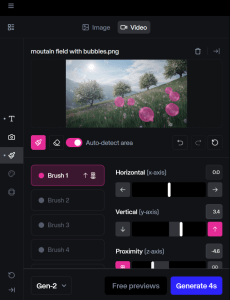
One of the things I like about RunwayML is the built-in motion brush. A couple of the others have it as well, but this one tends to be the easiest. You can click on parts of the first frame image and set their movement separate to the rest of the image. And you can do this to multiple elements in the image.
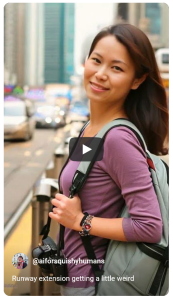
For example, if you click on the picture of the woman below, you’ll see her hair is waving in the wind, and one of the cars in the background is moving closer, at a different rate to other movement in the video. You’ll also see it gets very weird by the end – which is what tends to happen if you click on the ‘extend’ option to make your 4-5 second video longer.
Examples
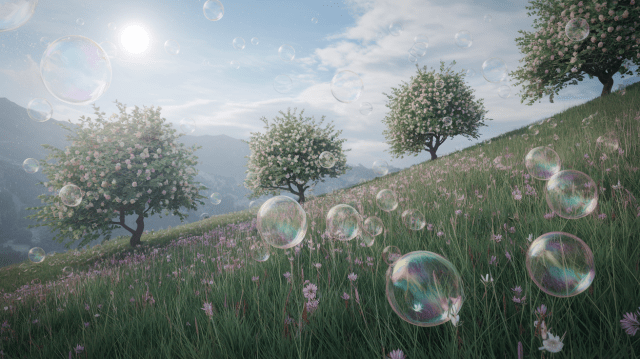
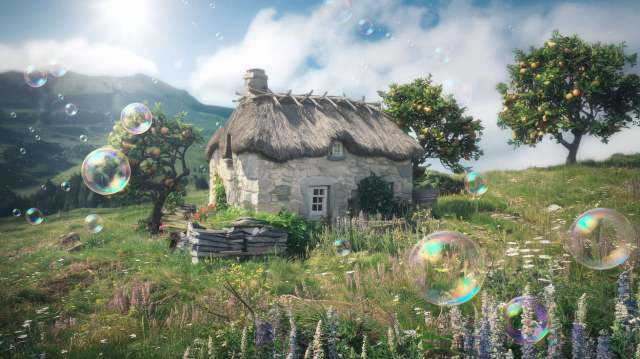
I have a couple of YouTube playlists of the different video generators, one is with the text prompt: A book dragon defending its hoard. The other is using the images below. Pika, RunwayML and Sora just have the first image as their prompt, the others use both images, the bubbles only one as the starting frame and the cottage as the end.
Images
Tool List
As always, not exhaustive, and prone to change…
Firefly – A newer addition to the Adobe Firefly suite and you get two free prompts to try it out. I think it’s the most user friendly interface of the lot, which makes sense given Adobe tends to aim their tools at companies, rather than creatives. I’m not overly fussed on video created by the text to image prompt, but I do find Firefly is better at real-world type stuff (especially current-day), so my prompt for a book dragon was not playing to its strengths.
Kling – A Chinese model, that also produces the Kolor image generator. It gives you monthly free credits, and the video generations take hours rather than days – it does have a reasonably accurate countdown timer to when you’re going to get it.
Luma – About the best of the free options, allows you 30 free video generations a month, but they’re slow. Even on the text to video prompts, this generates an image first, then asks if you want to make it into a video – this means you’re not wasting time and energy on full video prompts that don’t have the visuals you want. I also think it does nice images.
Pika – Has a free tier, with unlimited ‘Chill’ generations, which means they take forever to generate (as in days), but hey, free. As a reference point, the image prompt for the bubbles in the meadow video, took three days to generate. So if you’re not in anything like a hurry, it’s not a bad option.
Pika is best known for its Pika Effects, which are short, GIF-like videos, where they apply a special effect such as squish, cakeify, or melt to the subject of a picture you upload. Here’s one I did of a sticker being peeled off.
RunwayML – one of the most popular of the video generation tools. Quite easy to use, with nice-looking results. You can get a one-off set of credits to try it out, but then you need a monthly subscription. As mentioned, its text prompt ‘window’ is only 320 characters, so I’d strongly recommend image to video for this (and all of them, frankly).
Sora – this is the OpenAI one and only available to people using a paid version of Chat GPT. When it was first announced, it was the absolute standout, but all the tools in this list are now on about the same level.
Veo 2 – This is Google’s video tool and is the only one I’ve found where you can just straight up buy credits (which are valid for a year), rather than going the subscription route. I put a long text prompt into this one and it processed it, then offered me a list of summarised versions to choose from for the actual prompt. It seems to like faster videos than the others.
The usual caveat: This area of tech is moving insanely fast and while I’m aiming to stick to the foundations here, if you’re reading this post more than a month after it was published, check the details, things could be out of date.
 AI for Squishy Humans
Pingback: Making Music with AI – AI for Squishy Humans
Pingback: InVideo – How to make how-tos – AI for Squishy Humans